
How You Opt In to Text Messages
Last updated: October 17, 2026
Appa Capital Solutions, Inc. d/b/a FundWave Loans sends text messages only to business owners who gave us their mobile number in one of the ways listed on this page, or who texted us first. Every way is described below with the exact notice shown. Consent to receive texts is not a condition of any purchase or of receiving funding. Our SMS Messaging Terms and Privacy Policy apply. We do not share your mobile number, or your text-message consent, with third parties or affiliates for their marketing.
1. Apply Now form on our website
Page: https://www.fundwaveloans.com/apply-now. The person enters their contact details, including a mobile number. Directly above the “Submit Application” button the form shows:
By clicking “Submit Application,” I agree to receive text messages and phone calls from Appa Capital Solutions, Inc. d/b/a FundWave Loansat the number I provided, including messages sent with automated technology, about my funding inquiry: application status, document requests, offers, and reminders. Consent is not a condition of any purchase or funding. Message frequency varies. Msg & data rates may apply. Reply STOP to opt out or HELP for help. See our Privacy Policy and SMS Terms.
2. Contact form on our website
Page: https://www.fundwaveloans.com/contact. Directly above the “Send Message” button the form shows:
By clicking “Send Message,” I agree to receive text messages and phone calls from Appa Capital Solutions, Inc. d/b/a FundWave Loansat the number I provided, including messages sent with automated technology, about my funding inquiry: application status, document requests, offers, and reminders. Consent is not a condition of any purchase or funding. Message frequency varies. Msg & data rates may apply. Reply STOP to opt out or HELP for help. See our Privacy Policy and SMS Terms.
3. Online application link
After someone first contacts us, we send a personal link to our online application. The application’s last step shows the same notice, with the button named “Submit Application,” directly above the button.
4. Facebook and Instagram lead forms
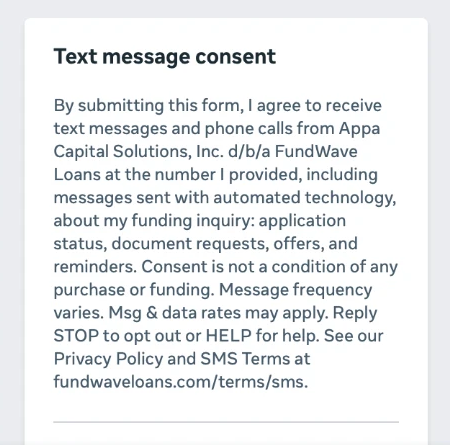
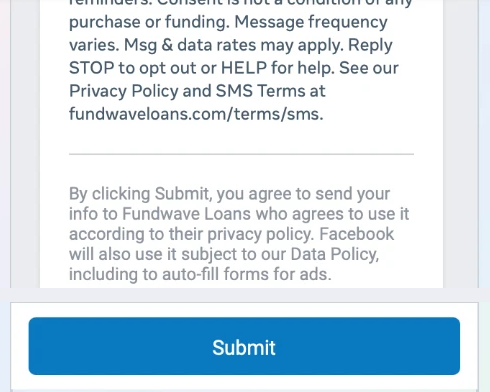
Our funding ads on Facebook and Instagram open a lead form where the person enters their company name, full name, email and phone number. The form shows this notice, titled “Text message consent,” above Facebook’s own privacy text and the Submit button. Its privacy link opens https://www.fundwaveloans.com/privacy. Screenshots of the form:
5. Texting us first
A business owner can also start the conversation by texting our number. We reply to that person about what they asked. They can reply STOP at any time to stop receiving texts.
Frequency, rates, and how to stop
Message frequency varies with where a person’s application is. Message and data rates may apply. Reply STOP to any message to stop texts, or HELP for help, or contact us at (806) 586-1275 or info@fundwaveloans.com.